
Category: Cybersecurity. Tags: cybersecurity, readiness-assessment, small-business-security.
A useful readiness assessment looks beyond a scan report
A small-business cybersecurity readiness assessment should explain whether the business can prevent common incidents, detect meaningful warning signs, recover from disruption, and assign ownership for the work that still needs to happen. A vulnerability scan can contribute evidence, but it is only one input. It does not tell you whether privileged access is controlled, whether Microsoft 365 is exposed to common account takeover paths, whether backups can be restored, or whether anyone would know what to do during an actual security event.
Who this applies to
This article is for small businesses, founder-led companies, lean operations teams, and internal IT generalists who need a practical baseline rather than a compliance theater exercise. It is also relevant to organizations that have already bought security tools but are not confident that the right controls are configured, monitored, and maintained.
The business problem with scan-only assessments
Many low-cost assessments stop after running a scanner, exporting a list of findings, and assigning generic severity labels. That approach creates three predictable problems.
- It overstates some issues and understates others because it ignores business context.
- It misses identity, cloud configuration, email, and recovery weaknesses that never show up as scanner findings.
- It leaves the client with a long list of tasks but no clear ownership, sequencing, or explanation of what matters first.
A readiness assessment is supposed to help a business make better security decisions. If the output cannot guide budgeting, prioritization, or operational follow-through, it is not doing that job.
Identity and access should be one of the first sections
For many small businesses, identity is the real perimeter. A useful assessment should review who has administrative access, where privileged accounts exist, whether multifactor authentication is enforced, and how shared access is handled. It should also identify dormant accounts, risky guest access, weak offboarding practices, and any sign that critical systems rely on a single person retaining undocumented access.
If the assessment covers only endpoints and firewalls while ignoring cloud identity, the organization can still be one phishing email away from a serious incident.
Microsoft 365 or cloud configuration needs direct review
If the company runs on Microsoft 365, Google Workspace, AWS, Azure, or similar cloud services, the assessment should include the administrative and security settings that shape real-world risk. That includes mailbox forwarding, external sharing, legacy access, tenant-wide defaults, logging availability, and how business data is exposed to third parties or unmanaged devices.
When working with one customer in looking at their AWS setup, the founders were completely convinced their infrastructure was private. They’d built their database and backend API inside their Virtual Private Cloud, assuming that because the word Private was in the name, their servers were hidden from the world unless explicitly mapped to a public domain.
The reality was that everything was sitting inside the AWS Default VPC. By default, every subnet in that environment had MapPublicIpOnLaunch enabled, routing all traffic through an attached Internet Gateway. Every time they launched an EC2 instance or a database node, AWS silently assigned it a globally routable public IPv4 address. To top it off, they’d opened up custom application ports and PostgreSQL on port 5432 in their Security Group for testing.
For nearly eight months, they operated under the total illusion of security. The wake-up call came when their database CPU randomly spiked to 100%. I pulled the access logs and showed them thousands of automated connection attempts per hour hitting their database from random global IPs. Automated internet scanners like Shodan had indexed their entire environment months ago; the only thing standing between them and a full data breach was a decent database password.
I had to explain that their backend had been sitting wide open on the public internet the whole time. We immediately tore down the Default VPC setup, migrated their workloads into proper private subnets behind a NAT Gateway, and locked down their Security Groups so their internal data actually stayed internal.
The point is not to create a complete architecture review. The point is to confirm whether the current cloud configuration is aligned with the business size, risk tolerance, and internal support model.
Endpoint security still matters, but context matters more
Endpoint protection should be reviewed as a control set, not just as a licensing line item. The assessment should confirm whether devices are inventoried, covered by antivirus or endpoint detection tooling, receiving updates, encrypted, and managed consistently across laptops, desktops, and remote users.
It should also check whether alerting and response responsibilities are understood. A business does not benefit from “having endpoint protection” if no one reviews alerts or if unmanaged devices still access business email and files.
Patch and vulnerability management needs an operational lens
The assessment should ask how vulnerabilities are identified, who owns remediation, how quickly critical updates are applied, and what happens when a patch cannot be installed immediately. That is different from merely listing open CVEs.
A practical review should distinguish:
- Internet-exposed systems from internal-only systems.
- Critical business platforms from lower-impact assets.
- Supported systems from legacy systems that need compensating controls or replacement planning.
This helps the business move from “we have a lot of findings” to “we know which backlog items actually change risk.”
Backups and recovery are core readiness topics
Many small businesses believe they are covered because backups exist somewhere. A readiness assessment should check what is backed up, how often, where backups are stored, who can access them, and whether restore testing happens. It should also ask whether the organization can recover Microsoft 365 content, cloud workloads, critical documents, and line-of-business data within an acceptable time frame.
If restore capability has never been tested, the assessment should say so directly. Backup presence is not the same as recovery readiness.
Email security is still one of the highest-value areas to review
Email remains a primary path for account takeover, malware delivery, invoice fraud, and social engineering. A useful readiness assessment should inspect mailbox protection controls, user reporting options, spoofing protections, forwarding behavior, and the handling of high-risk accounts such as finance, leadership, and administrators.
It should also identify whether basic email authentication controls are configured and whether leadership understands the residual risk that still exists even after technical controls are improved.
Logging, monitoring, and incident readiness reveal whether the business can respond
A business may have several security tools but still lack enough visibility to investigate an incident. A readiness assessment should confirm which logs are retained, whether alerts are generated for meaningful events, and who would investigate suspicious activity.
The incident-readiness section should answer practical questions:
- Who needs to be notified first?
- Is there a basic triage process?
- Are legal, insurance, or regulatory escalation paths known?
- Is there a way to isolate accounts or devices quickly?
Without those answers, the business is depending on improvisation during a high-stress event.
Policies, responsibilities, and third-party access should not be skipped
Small businesses often rely on informal processes, external IT providers, SaaS vendors, and contractors. A readiness assessment should identify who is responsible for key controls, where decisions are undocumented, and whether third-party access is broader than necessary.
This does not require enterprise bureaucracy. It requires enough clarity that the business can answer basic questions about ownership, approval, and escalation without guessing.
Findings should be prioritized in business language
A good final report should not read like an exported spreadsheet. It should explain:
- The most important risks in plain language.
- Why those risks matter to business operations.
- Which issues need immediate action versus planned remediation.
- Which improvements depend on people, process, or tooling.
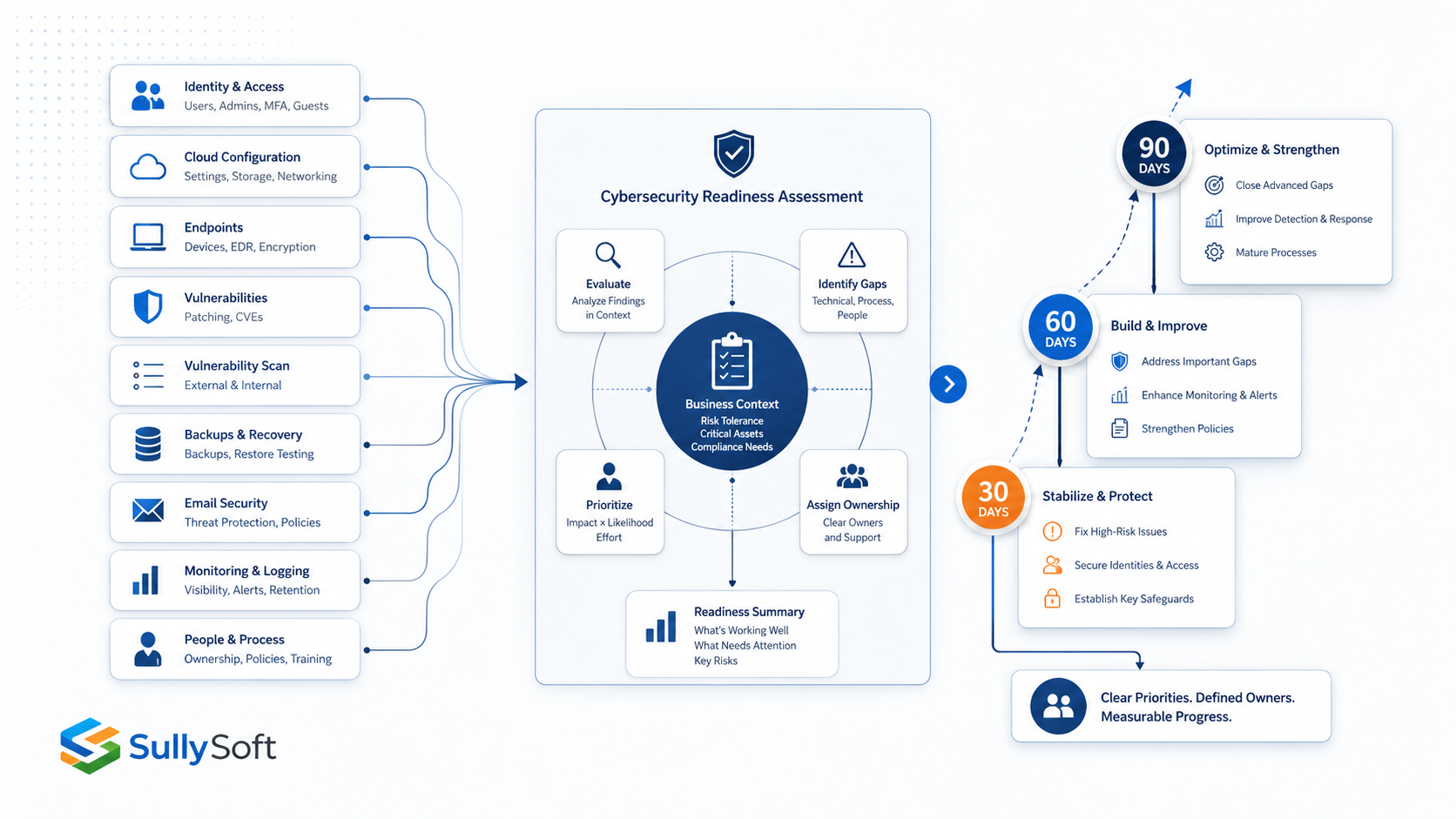
- What sequence makes sense for the next 30, 60, and 90 days.
That prioritization should reflect exposure, impact, and feasibility, not just generic severity labels.
What the final report should contain
A useful report usually includes an executive summary, scope and assumptions, current-state observations, risk-ranked findings, recommended actions, and a realistic roadmap. It should also note limitations so the business understands what was and was not reviewed.
A SullySoft readiness scorecard summarizes the reviewed security areas, such as identity, endpoints, email, backups, patching, remote access, and cloud exposure, and highlights where controls are working, where meaningful gaps exist, and what should be addressed first. It is paired with risk-ranked findings, practical quick wins, and a 30/60/90-day improvement roadmap so the assessment leads to action rather than another unresolved findings list.
The best reports also identify decision points. For example, if a company can reduce significant risk either by tightening Microsoft 365 administration or by replacing an unsupported server, the report should say that clearly rather than hiding the choice inside technical detail.
Common low-value assessment practices to avoid
Some assessment approaches create activity without much decision support. Common warning signs include:
- Heavy emphasis on scanner output with almost no identity or cloud review.
- Long findings lists with no business ranking or remediation sequence.
- Generic advice copied from frameworks without explaining fit.
- No verification of backups, logging, or incident handling.
- Recommendations that assume enterprise staffing or tooling budgets.
If the output could be given to almost any company without changing the recommendations, it probably was not specific enough to be worth much.
Recommended next step
If you want the assessment to guide actual security improvement, start with a scoped review that combines technical checks, stakeholder questions, and business prioritization. The goal is not to prove that security is imperfect. The goal is to identify the limited set of actions that materially improve readiness.
Relevant SullySoft CTA
Use the Cybersecurity Readiness Snapshot when you need a practical baseline, risk-ranked findings, and a clear next-step roadmap instead of a scan-only artifact.
Sources and references
About the author

Mike Sullivan
Mike Sullivan leads SullySoft engagements across cybersecurity, cloud architecture, automation, and secure software delivery.
Relevant next step
Move from article advice to a scoped recommendation
Use this article as a starting point, then map the recommendations to your environment, constraints, and priorities.